Sell it. Build it. Ship it.
Welcome to TimberCloud — the easiest way to sell custom products online. Whether you're a woodworker, metal fabricator, or custom manufacturer, you can have a fully functional storefront live on your website in under 5 minutes.
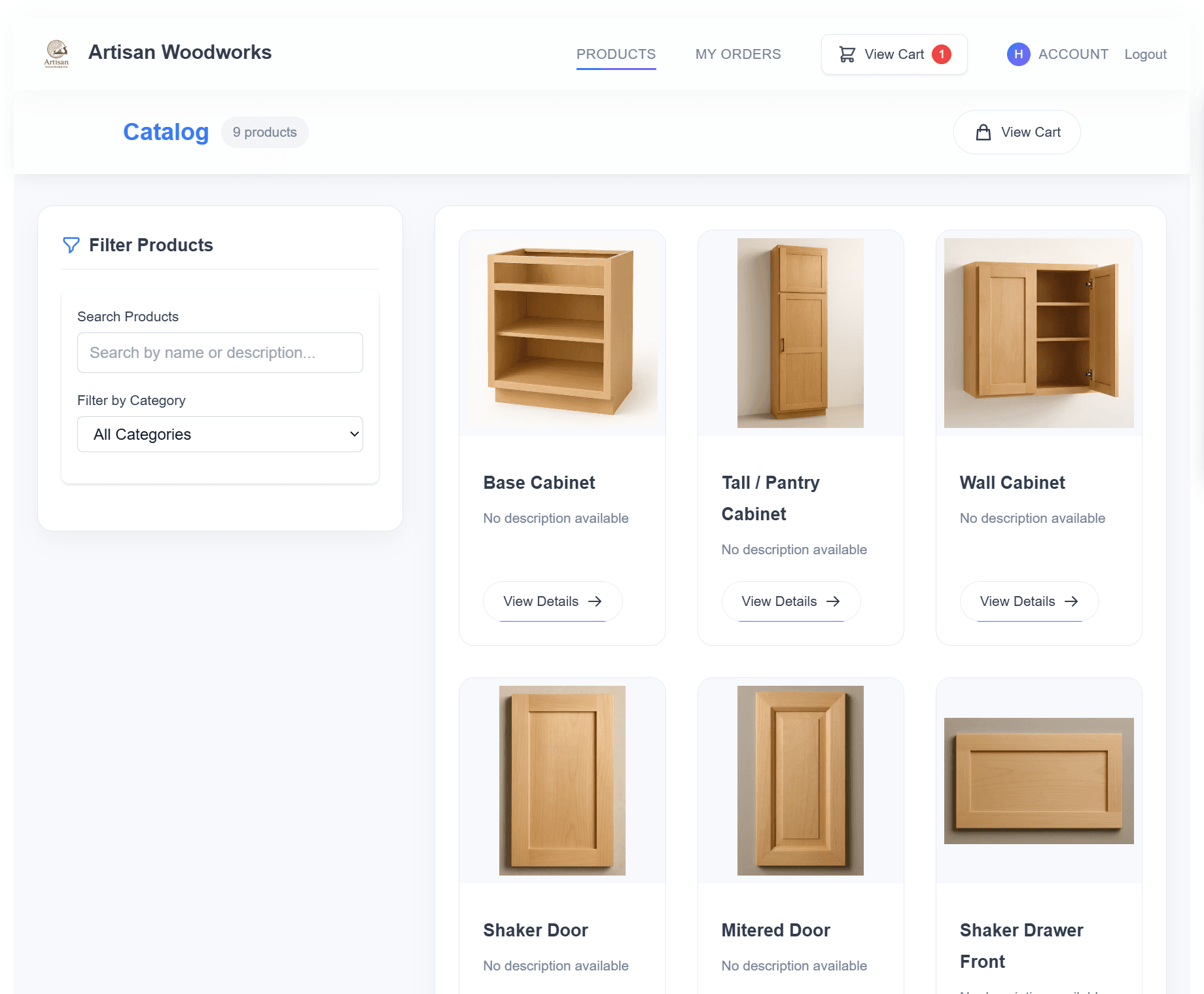
Copy. Paste. Sell.
Getting started is incredibly simple. Just copy and paste a few lines of code into your website, and your store is live:
<div id="timbercloud-embed"></div>
<script
  src="https://embed.timbercloud.com/embed.js"
  data-company="your-company-slug"
  data-height="900px"
  defer
></script>
That's it. Your customers can now browse products, configure options, and place orders — all without leaving your website. No complicated setup, no developers needed.
Two Ways to Embed
Choose the integration method that works best for you:
| Method | Best For | Code |
|---|---|---|
| Script Embed | Most websites | <div> + <script> with data attributes |
| Iframe Embed | Custom styling needs | Direct <iframe> tag |
Script Embed (Recommended):
<div id="timbercloud-embed"></div>
<script
  src="https://embed.timbercloud.com/embed.js"
  data-company="your-company-slug"
  data-theme="light"
  data-height="900px"
  defer
></script>
Iframe Embed:
<iframe
  id="timbercloud-embed"
  src="https://embed.timbercloud.com/your-company-slug"
  width="100%"
  height="900"
  style="border: none; border-radius: 8px;"
  allow="payment"
></iframe>
Both methods give you a complete storefront with product catalog, shopping cart, checkout, and customer accounts. Learn more about embedding →
Why TimberCloud?
For Makers Who Want to Sell Online
TimberCloud is built specifically for businesses that sell custom, configurable products. Traditional e-commerce platforms don't understand variable pricing, cut-to-size products, or complex configurations. We do.
Your Store, Your Brand
The embeddable storefront is fully white-labeled and matches your website's look and feel. Your customers see your brand, not ours.
Everything You Need
- Product Catalog — Display products with custom options, measurements, and pricing
- Shopping Cart — Customers can build orders with multiple configured products
- Secure Checkout — PCI-compliant payment processing with Stripe
- Order Tracking — Real-time updates from production to delivery
- Customer Accounts — Let customers view history and reorder
Works Everywhere
Add TimberCloud to any website in minutes:
| Platform | How It Works |
|---|---|
| WordPress | Paste code into a Custom HTML block |
| Shopify | Add to any page using the HTML editor |
| Wix | Use the Embed HTML widget |
| Squarespace | Insert via Code Block |
| Custom Site | Works with any HTML page |
Built for Custom Products
Variable Pricing Made Easy
Create products with dynamic pricing based on dimensions, materials, or any attribute. Our visual formula builder makes it simple — no coding required.
Parts & Components
Define product components once. They're automatically used for both production build sheets and intelligent shipping calculations.
Smart Packaging
Our packaging system optimizes how products are grouped for shipping, often significantly reducing shipping costs.
Grow Your Business
Multi-Location Inventory
Track stock across warehouses, showrooms, or production facilities with automated assignments and reorder alerts.
Global Commerce
Sell internationally with support for 40+ locales, 25+ currencies, and localized payment methods.
Real-Time Everything
Live inventory updates, instant pricing calculations, and real-time order tracking keep your customers informed.
Advanced Features When You Need Them
As your business grows, TimberCloud grows with you:
- 3D Kitchen Designer — Design cabinets and full kitchens in 3D, price them instantly with no catalog product required, and turn a design straight into an order (Build plan and up)
- Visual Editors — Build complex pricing formulas and production documents without code
- AI Document Processing — Upload a blueprint, PDF, or spreadsheet and let AI draft an order for you
- Quality Control — Track inspections and maintain quality standards
- Team Management — Add users with custom roles and permissions
- Reports & Analytics — Understand your business with detailed insights
Where to start
New to TimberCloud? These docs are organized as an onboarding path — follow it in order:
- Getting Started — create your account and company, then choose a plan. Start on the free plan if you're just collecting leads and want a storefront live today.
- Build your catalog — add your products, options, pricing, and parts in the Product Builder. This is where most of your setup time goes, and where the most powerful (and easily-missed) features live.
- Put your catalog in front of customers — publish a hosted website and/or drop the embeddable storefront onto your existing site. Same catalog, two front doors.
- Take orders and get paid — manage quotes and orders and collect payment directly into your own Stripe account.
- Grow as you scale — add shipping, the 3D Kitchen Designer, inventory and purchasing, the shop floor tools, reports, and your team.
Have questions? Contact our team at support@timbercloud.com.
TimberCloud — Sell custom products online, the easy way.